Updating DAR resource files
Every Data Access Request (DAR) project consists of below key files:
1) config
2) governance/project
3) access/access
4) metadata/dataset
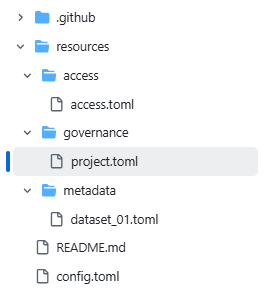
They are all toml files. The cr8tor initiate command uses a cookie-cutter template which provides you with the basic version of them. The content needs to be updated with relevant information before you can successfully run the orchestration workflow.
config
The config file contains the following fields, which must be populated with relevant information:
| Field | Description |
|---|---|
Source-Organization |
eg. LSC SDE |
Organization-Address |
eg. Lancashire Teaching Hospitals NHS Trust, PR2 9HT |
Contact-Name |
eg. LSC SDE Program Team |
Contact-Email |
eg. lsc.sde@test.com |
governance/project
The governance/project contains the following fields, which must be populated with relevant information:
[project]
| Field | Description |
|---|---|
description |
eg. example-project created using CR8TOR. |
reference |
auto-generated by cookie-cutter based on project_name. Pattern cr8-<project_name> |
name |
auto-generated by cookie-cutter based on project_name |
project_name |
follow organisation policy for project naming convention |
[project.destination]
| Field | Description |
|---|---|
type |
Destination type. Supported values: [filestore, postgresql] |
name |
Destination name (for filestore destinations, this drives storage location), e.g., [LSC, NW] |
format |
Data format for filestore destinations. Supported values: [csv, duckdb] |
Supported Destination Types
The CR8TOR Publisher supports two main destination types, each with different behaviors and requirements:
Filestore Destination (filestore)
When type = "filestore", the Publish Service stores data as files in a mounted filestore rather than a database.
Key Characteristics:
- File-based Storage: Data is stored as files (CSV or DuckDB format) in mounted filesystem paths
- Destination-Specific Storage: The
namefield drives storage location via environment variables (TARGET_STORAGE_ACCOUNT_{NAME}_SDE_MNT_PATH) - Two-stage Process: Data flows through staging container first, then moves to production container
- BagIt Packaging: Files are organized following BagIt standards with SHA512 checksums for integrity verification
- Format Options: Supports both CSV and DuckDB formats for flexible data consumption
Required Fields:
type = "filestore"name- Destination name (e.g., "LSC", "NW") that determines storage mount pointformat- Data format: "csv" or "duckdb"
Directory Structure Created:
{storage_mount_path}/
├── staging/
│   └── {project_name}/
│       └── {project_start_time}/
│           └── data/outputs/
└── production/
    └── {project_name}/
        └── {project_start_time}/
            └── data/outputs/
PostgreSQL Destination (postgresql)
When type = "postgresql", the Publish Service loads data directly into a PostgreSQL database and creates OPAL resources for secure access.
Key Characteristics:
- Database Storage: Data is loaded directly into PostgreSQL tables
- OPAL Integration: Automatically creates Obiba OPAL components for secure data access:
- Creates OPAL project named after the CR8TOR project
- Establishes OPAL resources pointing to PostgreSQL tables
- Creates DataSHIELD permission groups (
{project_name}_group) - Sets up DataSHIELD and resource-level permissions
- Access Control: Leverages OPAL's DataSHIELD framework for secure, privacy-preserving data analysis
- Table Filtering: Filters tables based on project name and start time patterns, excluding DLT internal tables
Required Fields:
type = "postgresql"name- Destination name (used for OPAL project identification)format- Not applicable for PostgreSQL destinations
OPAL Resources Created:
- Resource Naming:
tre_postgresql_{schema}_{table} - Project Structure: One OPAL project per CR8TOR project
- Group Management: DataSHIELD groups with "use" and "view" permissions
- User Management: Ensures default DataSHIELD user (
dsuser_default) exists
Choose filestore for file-based data delivery and postgresql for database-hosted data with integrated access control through OPAL's DataSHIELD framework.
[repository]
| Field | Description |
|---|---|
codeRepository |
Auto-generated by cookie-cutter. e.g., https://github.com/lsc-sde-crates/cr8-example-project |
description |
Auto-generated by cookie-cutter. |
name |
Auto-generated by cookie-cutter. |
[requesting_agent]
| Field | Description |
|---|---|
name |
e.g. Prof. Jane Doe |
[requesting_agent.affiliation]
| Field | Description |
|---|---|
url |
e.g. https://someuni.com |
name |
e.g. Jane Doe's University |
access/access
The access/access contains the following fields, which must be populated with relevant information:
[source]
The required source fields depend on the type of the source. The Solution supports extracting data from multiple source types including Databricks SQL warehouse endpoints and various SQL databases. The required fields for each type are validated by cr8tor and cr8tor-publisher app (using pydantic models).
Supported Source Types
The following source types are currently supported:
databrickssql- Databricks Unity Catalogpostgresql- PostgreSQL databasesmysql- MySQL databasesmssql- Microsoft SQL Server databasessqlserver- Microsoft SQL Server databases (alternative identifier)
Common Source Fields
| Field | Description |
|---|---|
name |
Name of the data source, e.g., My Database Connection. |
type |
Must match one of the supported source types listed above. |
host_url |
Host URL of the database server. |
Databricks Unity Catalog (databrickssql)
For Databricks Unity Catalog sources, the following additional fields are required:
| Field | Description |
|---|---|
http_path |
HTTP path for the Databricks SQL Warehouse endpoint, e.g., /sql/1.0/warehouses/0aec44b2e70e201d. |
port |
Optional. Default is 443 for Databricks SQL endpoints. |
catalog |
Databricks Unity Catalog name from which data will be extracted. |
SQL Databases (postgresql, mysql, mssql)
For SQL database sources, the following additional fields are required:
| Field | Description |
|---|---|
database |
Database name to connect to. |
port |
Database connection port (varies by database type). |
[credentials]
Credentials fields are tied to the source type. Different source types require different credential configurations:
Databricks Unity Catalog Credentials
For Databricks SQL endpoints, we use Databricks Service Principal (SPN). See here how to create a new SPN and assign required roles and permissions.
| Field | Description |
|---|---|
provider |
Credential provider, e.g., AzureKeyVault. |
spn_clientid |
Key name in secrets provider containing Service Principal client ID, e.g., databricksspnclientid. |
spn_secret |
Key name in secrets provider containing Service Principal secret, e.g., databricksspnsecret. |
SQL Database Credentials
For SQL database sources (PostgreSQL, MySQL, MSSQL), we use username/password authentication:
| Field | Description |
|---|---|
provider |
Credential provider, e.g., AzureKeyVault. |
username_key |
Key name in secrets provider containing database username, e.g., db-username. |
password_key |
Key name in secrets provider containing database password, e.g., db-password. |
metadata/dataset
We expect a single file per dataset (in terms of Databricks SQL source, it is per Unity Catalog schema).
The metadata/dataset file is contains the following fields, which must be populated with relevant information:
| Field | Description |
|---|---|
name |
Name of the dataset, e.g., dataset_1. |
description |
Description of our dataset. |
schema_name |
Schema name, e.g., z__cr8tor_poc. |
Warning
Now, we can define the tables and columns we want to retrieve, but this is optional. If we do not provide tables and/or columns, the solution will retrieve all available tables and/or columns.
[[tables]]
| Field | Description |
|---|---|
name |
Name of the table, e.g., domain. |
[[tables.columns]]
| Field | Description |
|---|---|
name |
Name of the column, e.g., domain_concept_id. |